
I Have a Client — What Do I Do Next?
Have a client but not sure where to start? Annuities Genius can help you bring in what you already know, organize the case, identify what's missing, and prepare for your next client conversation.
1. Create Your Client
Select + Create Client to get started.

Already have information about the client? Select AI Import to bring it into Annuities Genius without entering everything manually.
Bring Your Case & Skip the Typing
With AI Import, you can:
Paste or Type Information
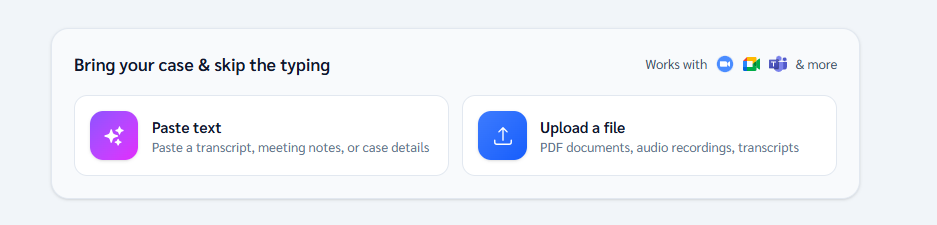
Type client details directly into the box, or paste information you already have, such as meeting notes, a transcript, discovery notes, or other case details.
Upload a File
Upload PDFs, documents, audio recordings, or transcripts containing client or case information.
If you've already had a conversation with the client, start with what you have instead of starting over.
2. Reviewing an Existing Annuity?
Select + Statement to upload the client's existing annuity statement.
This can help capture information that's already available and reduce unnecessary back-and-forth with your client.
3. What Information Am I Still Missing?
Before running the case, use GrantAI to help identify what else you may need.
Try:
“Here's what I know about my client so far. What important information am I still missing to properly analyze this case?”
Depending on the situation, this may include:
- Retirement goals and timeline
- Current account values
- IRA or 401(k) information
- Social Security or pension income
- Retirement income needs
- Liquidity needs
- Spouse/joint information
- Existing statements or policies
The goal: identify what's missing before going back to the client so you're not repeatedly chasing one more piece of information.
4. Don't Understand Something? Ask GrantAI
Use GrantAI to help you better understand concepts that come up during a case.
For example:
“Explain IRMAA to me as a newer agent, then give me a simple way to explain it to my client.”
You can also ask about RMDs, 401(k) rollovers, Social Security, retirement income, surrender periods, income riders, qualified vs. non-qualified funds, and other retirement concepts.
5. Analyze the Case
Once you have the information you need, use Annuities Genius to research products, compare options, calculate income, and create illustrations.
Not sure which tool to use? Ask GrantAI:
“Based on this client's situation and goal, which Annuities Genius tool should I use next?”
6. Prepare for the Client Conversation
After completing your analysis, use GrantAI to help turn the results into a simpler client conversation.
Try:
“Explain the key findings from this analysis in simple language I can use with my client.”
You can also use GrantAI to help prepare a client-friendly follow-up email.
Still Need Help?
If you've prepared the case but still need another set of eyes, you can share the case with the person who normally helps you run cases - such as your General Agent, IMO, FMO, EMD, case manager, marketer, upline, or business partner.
Using Share Case allows them to review the case you've already prepared and help you determine the appropriate next steps without starting over.
If your organization offers Case Design Requests, you may also be able to request additional case assistance directly from the client's profile.
Annuities Genius Support can help you navigate the platform, find the appropriate tools, and understand how to use available features.
For product recommendations, suitability decisions, licensing requirements, or guidance outside the platform, contact your upline, IMO, case design team, or compliance resource.
Have questions? Contact Annuities Genius Support by phone 949-600-7707, email - help@annuitiesgenius.com , or live chat during business hours.